Our Philosophy
The goal of Aave App is to bring the benefits of our new, open, transparent, global, 24/7 financial system to everyone, and not just technologists, tinkerers, and crypto-natives. In fact, this has been a foundational goal of our entire industry since its very inception.
To successfully achieve this goal, numerous changes are required to how our industry has traditionally approached everyday consumer applications. Thinking just about the savings use case for now, here are some major non-negotiable features:
- Fixed, predictable interest rates
- Balance protection / insurance
- Account management & recovery that feels familiar
- Instant zero-fee bank deposits and withdrawals
We aim to do an article on each one of these non-negotiable features. In this article, we exclusively focus on the account layer. How do accounts work in Aave App, and what makes them usable by everyday people?
An Overview
For Aave App to be usable by everyone, its account system must match industry standards & user expectations for how other modern financial & non financial applications work. This has been a challenge that has plagued our industry, mostly due to the tension between (i) giving users full control over their accounts (being self-custodial) and (ii) providing them with easy to use authentication mechanisms (email, phone numbers, passwords, etc) and built-in safety measures for recovery and attack prevention.
Accounts in Aave App set a new industry benchmark. Keeping users fully in control, while allowing them to sign up securely with the same ease as other top tier fintechs and recover their account in the event a cryptographic key is lost or compromised.
To sign up for Aave App, a user only needs to provide 2 pieces of information:
- An email or a phone number
- A password
In the event that a user forgets their password, there are two separate ways a user can regain access to their account:
- Device recovery: As easy as passing a FaceID. Requires access to a device previously signed in on.
- Biometric recovery: As easy as passing a face scan. Requires signing up for opt-in biometric recovery. Does not require having access to a device previously signed in on.
To prevent unauthorized withdrawals of funds, users pre-authorize withdrawal destinations, with an OTP code verification required from their email or phone number to add an allowed withdrawal destination.
On an implementation level, this works by the interaction between two components: a cryptographic key (The Signer) and a smart contract (The Smart Account). Next, we go a level deeper and look at how these components work under the hood.
The Signer
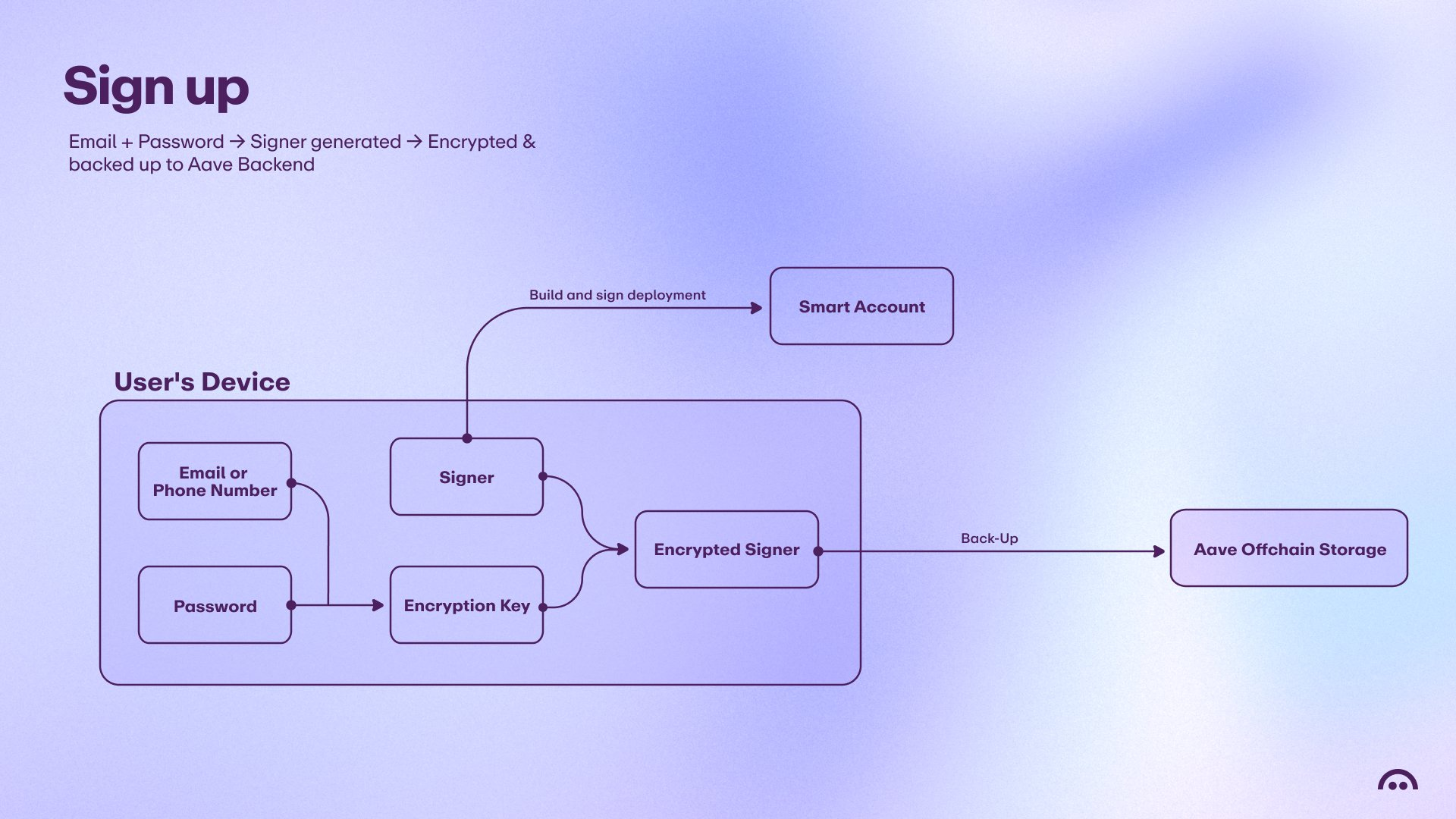
Every Aave App user has control over a cryptographic key (an EOA), much like what you would get if you used MetaMask, Rainbow, or any other Ethereum wallet. Aave App Signers differ from your average EOA in how they are accessed & recovered.
The private key behind the signer is created with a user’s device (e.g. on a phone with Aave App or on the web with Aave Pro). This private key is then encrypted with both a user-provided password & auth credential (email or phone number). The encrypted result is sent to the Aave backend & stored.
This system ensures that no matter what device the user is signing in on, they can still access their Signer, as they just need to pass an email or phone OTP check & enter the correct password. Additionally, this means that accounts in Aave App are not susceptible to SIM-swap attacks by themselves, as gaining access to an account requires a password.
This system sits in contrast to other embedded wallet solutions which are able to unlock the private key by solely having access to the auth credential, making them significantly less secure.
Additionally, a user may complement the use of a password with a passkey and enforce an additional OTP code from an authenticator app such as Google Authenticator.
In the event a user has lost their password but still has access to a device where they have signed in previously, the account is recoverable & their password updatable. This works due to their encryption key being stored in their device’s secure enclave.
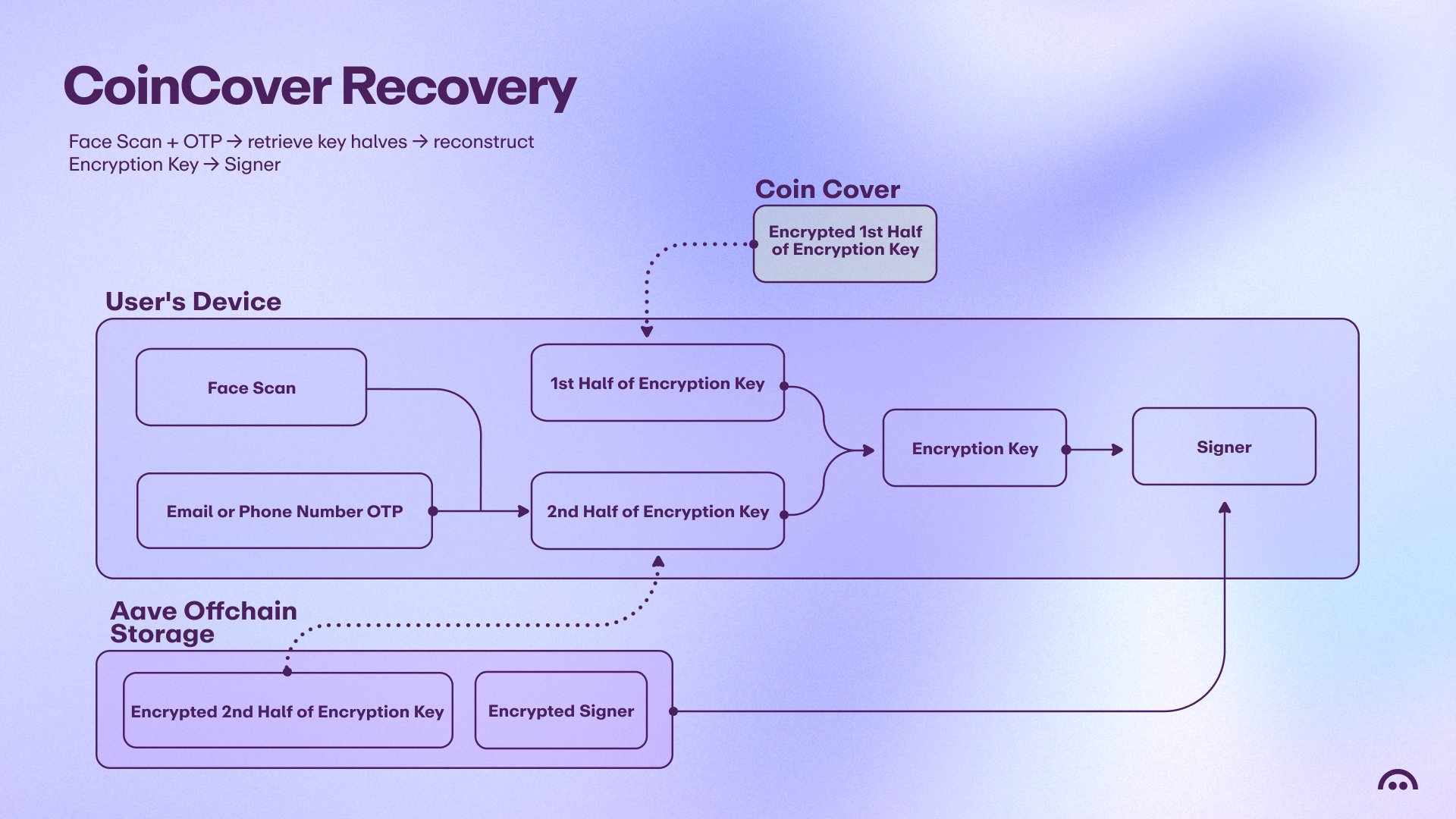
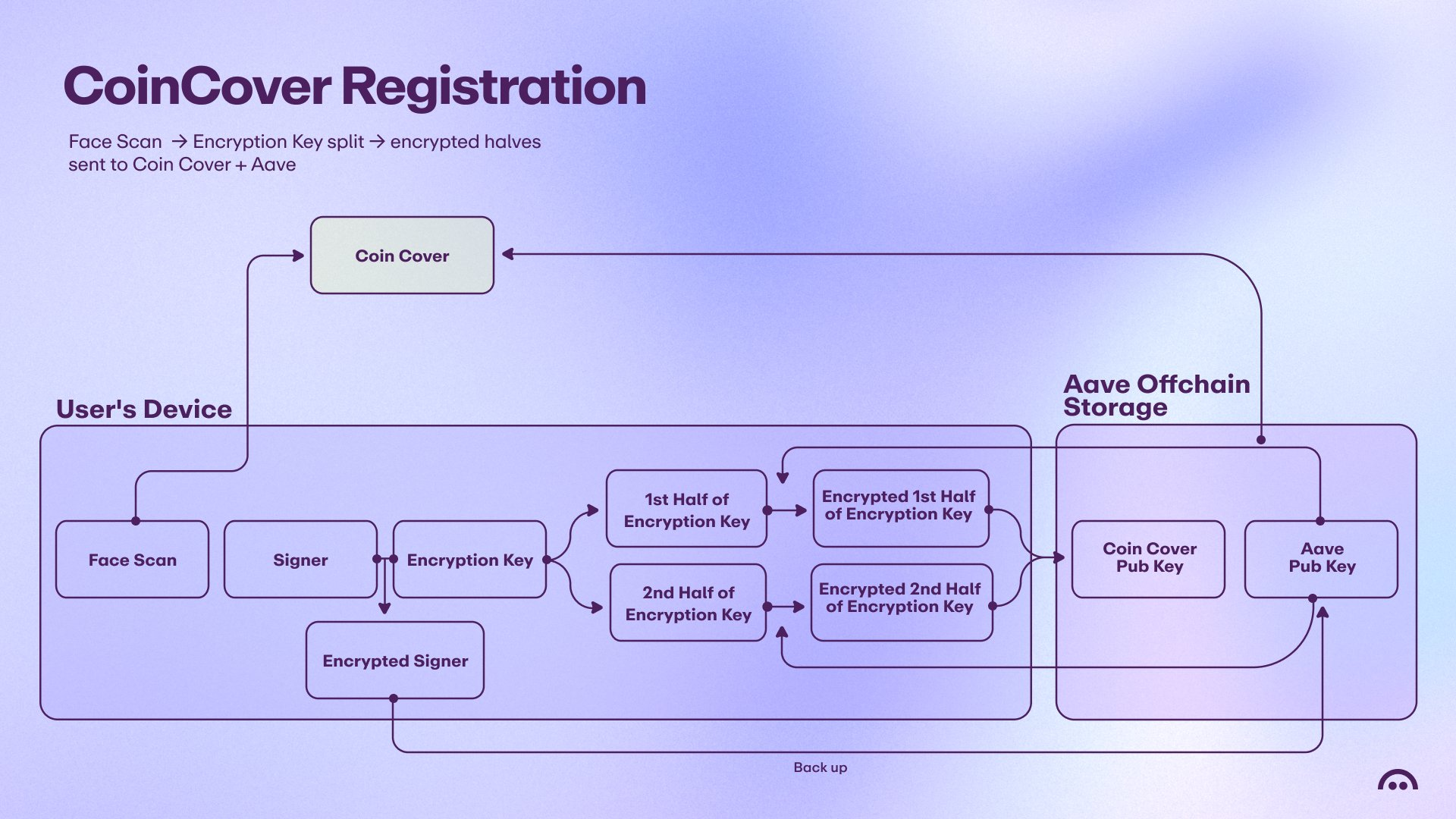
In the event a user has lost both their password and access to their device, the account is recoverable via their biometrics, an opt-in service provided by CoinCover. Signing up for biometric recovery involves a user scanning their face and sending the result to CoinCover. Their private key is encrypted and split in two. The first half is sent to CoinCover and the second half is sent to Aave, where the encryption key also sits.
Upon recovery, a user scans their face again and if CoinCover finds there is a match using multiple independent verification providers and AI-detection software, they release the first half of the user’s private key. Upon a successful OTP check sent to the user’s auth method, the Aave backend releases the remaining half of the encrypted private key, along with the encryption key.
The Smart Account
Aave App uses Alchemy’s Modular Account v2 (MAv2) smart contract wallet with custom ERC-6900 modules. We first decided to use MAv2 when building Stable Finance and will continue to use them for users of Aave App. The use of MAv2 allows, among other things to:
- Sponsor gas for users
- Batch multiple transactions together
- Require an additional signer for sensitive actions
- Allow limited actions to be performed on behalf of the user by Aave
The smart account allows the granting of limited scope permissions to 3rd parties. In Aave App, the user’s smart account grants access to Aave to move stablecoins from their smart wallet into the vault. This is done to prevent a user from having to come back to the app after their funds arrive to start earning yield, crucially important in the bank deposit scenario, where fiat settlement can take days.